A CAN bench you can run on your laptop
A BMS, a DC-DC converter and a VCU running Zephyr on an emulated CAN bus in Docker, and how to adapt it to your own nodes.
Part 1 of 2 in The CAN bench
Contents6 sections
If you work on a product with firmware in it, you probably test it a few different ways: unit tests on your machine, a HIL rig, a bench in the lab with some boards wired together, and eventually the real thing. All of them take upkeep, and the bench usually gets the least. Somebody builds it for a specific push, it earns its keep for a while, and then the firmware moves on, a board gets borrowed for something else, and a year later the tests on it fail for reasons nobody has time to chase.
We wanted a small bench that anyone on a team could run: a small CAN network with real firmware on it, living in a git repo, that comes up on a laptop or a CI machine and goes away when you're done. So we built one. The code is open source, so take whatever fits your own setup. The nodes and the bus need nothing from us; the bench also starts a Zelos agent, which part two puts to work.
What's on the bus
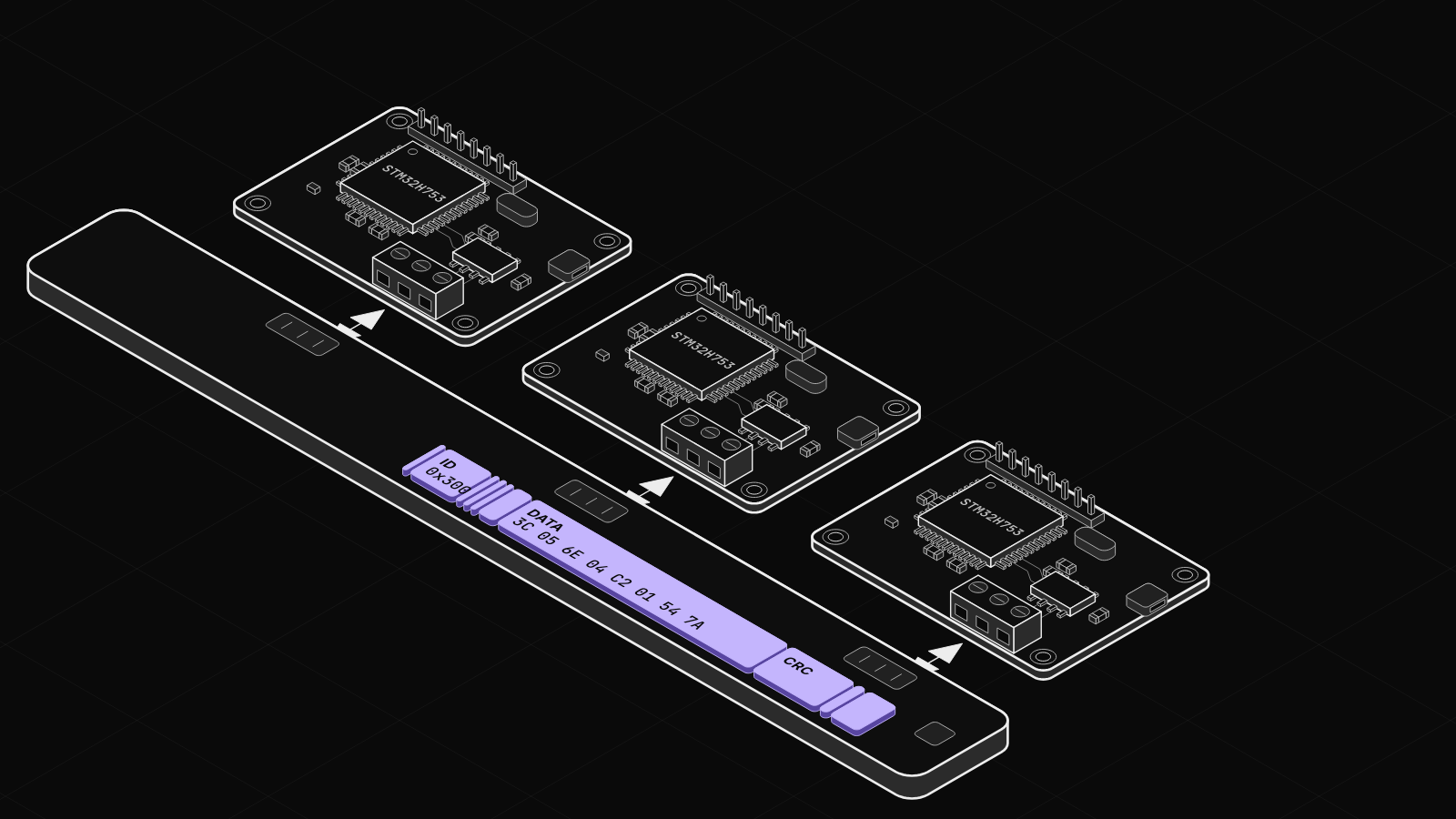
Three nodes that a lot of battery-powered products have some version of:
- a BMS that reports the pack and publishes how much current the rest of the system may draw,
- a DC-DC converter that runs the 12 V rail off the pack and stays under the limit the BMS gives it,
- a VCU that tells the BMS which mode the vehicle is in. It loops through standby, drive and charge every 15 s of firmware time.
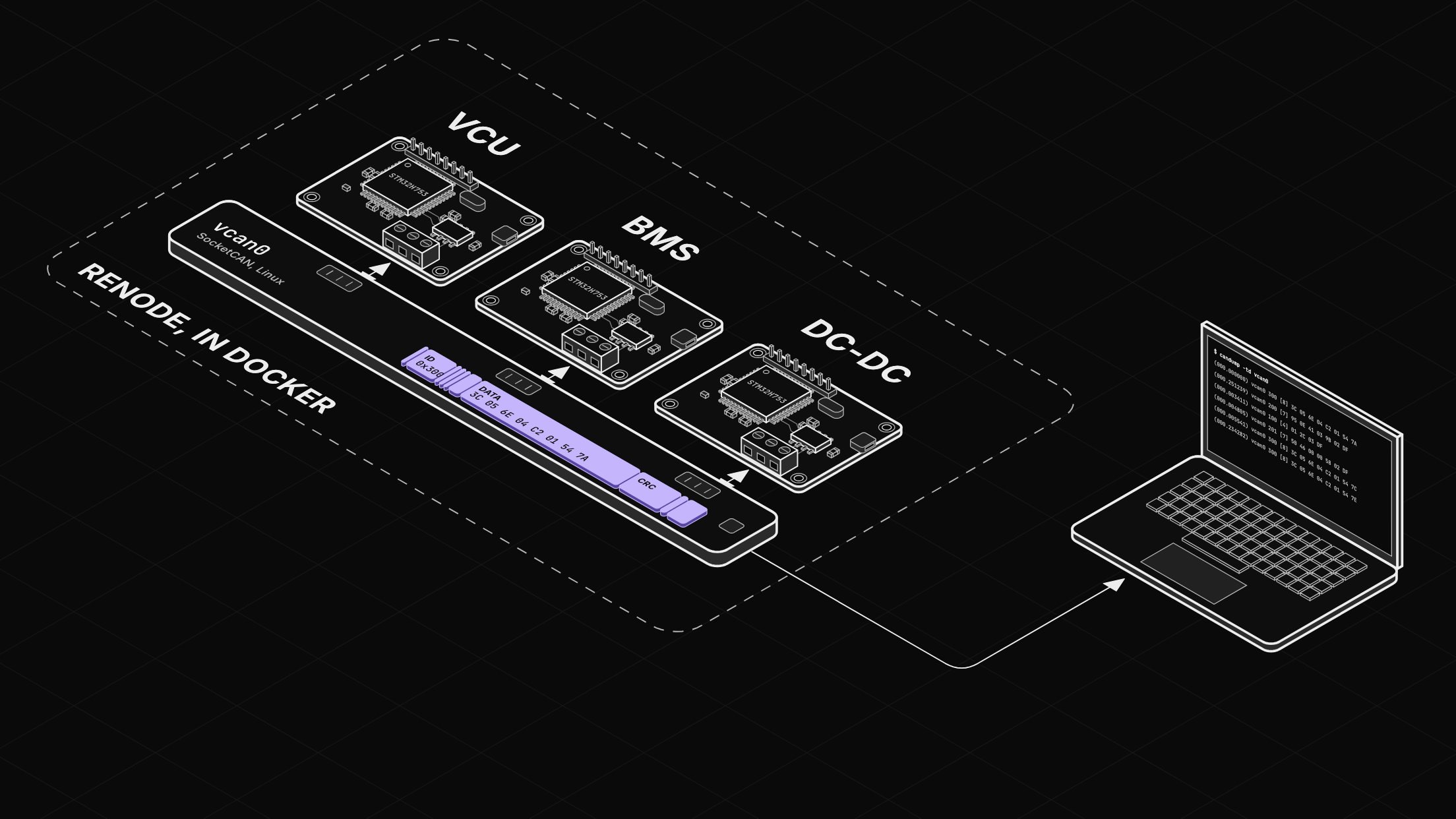
Each node is an ordinary Zephyr application running on an emulated STM32H753 in Renode. Renode connects the three over a virtual CAN hub and bridges that hub onto a Linux SocketCAN interface, vcan0. Anything that can open a CAN socket can read the bus, including candump, and all of it runs in Docker containers.
They exchange five messages:
| ID | Message | From | Period | Carries |
|---|---|---|---|---|
0x100 | VCU_Command | VCU | 100 ms | Mode, torque request, heartbeat |
0x200 | BMS_Status | BMS | 100 ms | Pack voltage and current, state of charge, contactor |
0x201 | BMS_Limits | BMS | 100 ms | Discharge, charge and auxiliary current limits |
0x202 | BMS_CellVoltages | BMS | 500 ms | Four cell voltages |
0x300 | DCDC_Status | DC-DC | 50 ms | Rail voltage and current, pack draw, temperature |
All of it is defined in one DBC file. The firmware's pack and unpack code is generated from that file with cantools, so nobody writes bit positions by hand, and anything that decodes the bus reads the same file.
Running it
You need Linux with Docker. On a Mac, run it inside a Linux VM; the README has the steps. Everything else, the Zephyr toolchain included, runs in containers:
git clone --branch can-bench-v1 https://github.com/zeloscloud/zelos-examples
cd zelos-examples/can-bench
just build
just up
just bus
The repo uses just as shorthand for a few Docker commands, and you can run those directly if you'd rather not install it. just build compiles the four firmware images in a container. The first run downloads the toolchain and the Zephyr workspace, about 3.4 GB, and takes a few minutes; just build dcdc rebuilds one node.
just up checks that the firmware is in build/ and runs docker compose up -d --wait. That starts three containers: one owns the virtual CAN interface, one runs Renode with the three nodes, and one runs the Zelos agent we use in part two, which you can ignore for now. just bus is docker compose exec renode candump -td vcan0:
 (000.000000)  vcan0  300   [8]  3C 05 6E 04 C2 01 54 7A
 (000.251239)  vcan0  200   [7]  95 0E 41 03 9B 02 DF
 (000.003411)  vcan0  100   [4]  01 2C 03 DF
 (000.004805)  vcan0  201   [7]  50 46 00 00 58 02 DF
 (000.005541)  vcan0  300   [8]  3C 05 6E 04 C2 01 54 7C
 (000.234282)  vcan0  300   [8]  3C 05 6E 04 C2 01 54 7E
The DC-DC shows up twice as often as the others because it runs at 50 ms. The timestamps are host time, and the bench runs slower than real time, so a 50 ms message arrives roughly every 250 ms; the next section explains why.
A few things that tripped us up
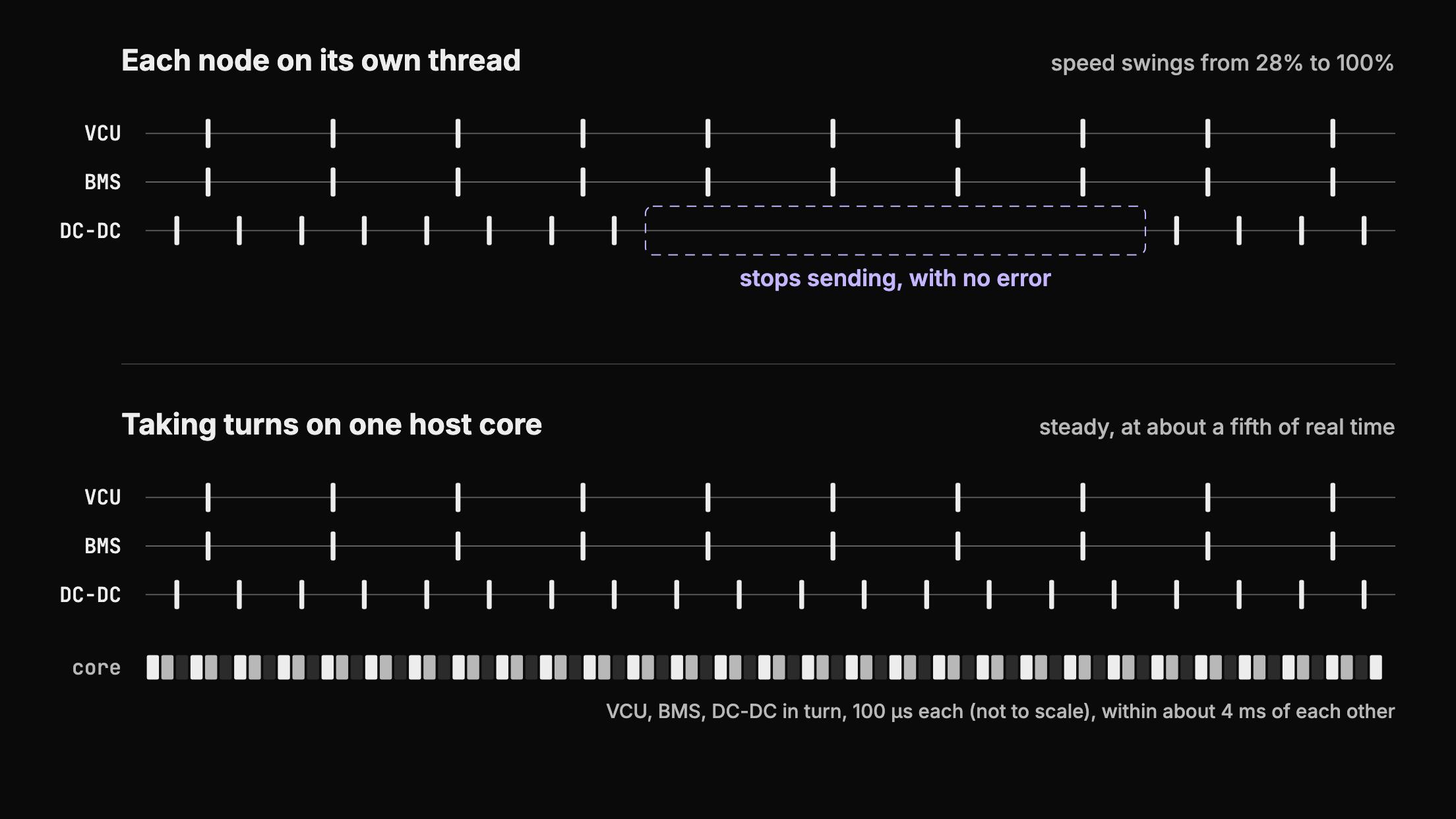
Nodes going quiet. By default Renode runs each emulated machine on its own thread. Every so often a node would stop transmitting, with no error anywhere, and speed swung between 28% and 100% of real time across identical runs. Switching Renode to serial execution stopped the dropouts and made the speed steady, and a 100 µs quantum keeps the three nodes within about 4 ms of each other. The cost is speed: the three emulated cores take turns on one host core, which we've measured at about a fifth of real time on a 12th Gen Core i7-1260P and about a quarter on an Intel N100. Inside the firmware, timing and values are exact. It's the host timestamps that run slow, so don't measure absolute rates from them.
Renode exiting the moment it starts. In a container, --console reads commands from stdin, hits end-of-file straight away, and shuts down cleanly with an empty log. That looks exactly like firmware dying on boot. --disable-gui with the monitor on a TCP port fixes it.
One bridge per bus. Bridge the hub onto vcan0 twice and every frame loops back in until the bus is full of its own echo.
Byte-swapped IDs. On Renode 1.15.1, frames leaving through the SocketCAN bridge had their IDs byte-reversed, so a frame sent as 0x001 showed up in candump as 0x000 (renode#641). It's fixed in 1.16.0, and we pin 1.16.1.
Breaking it on purpose
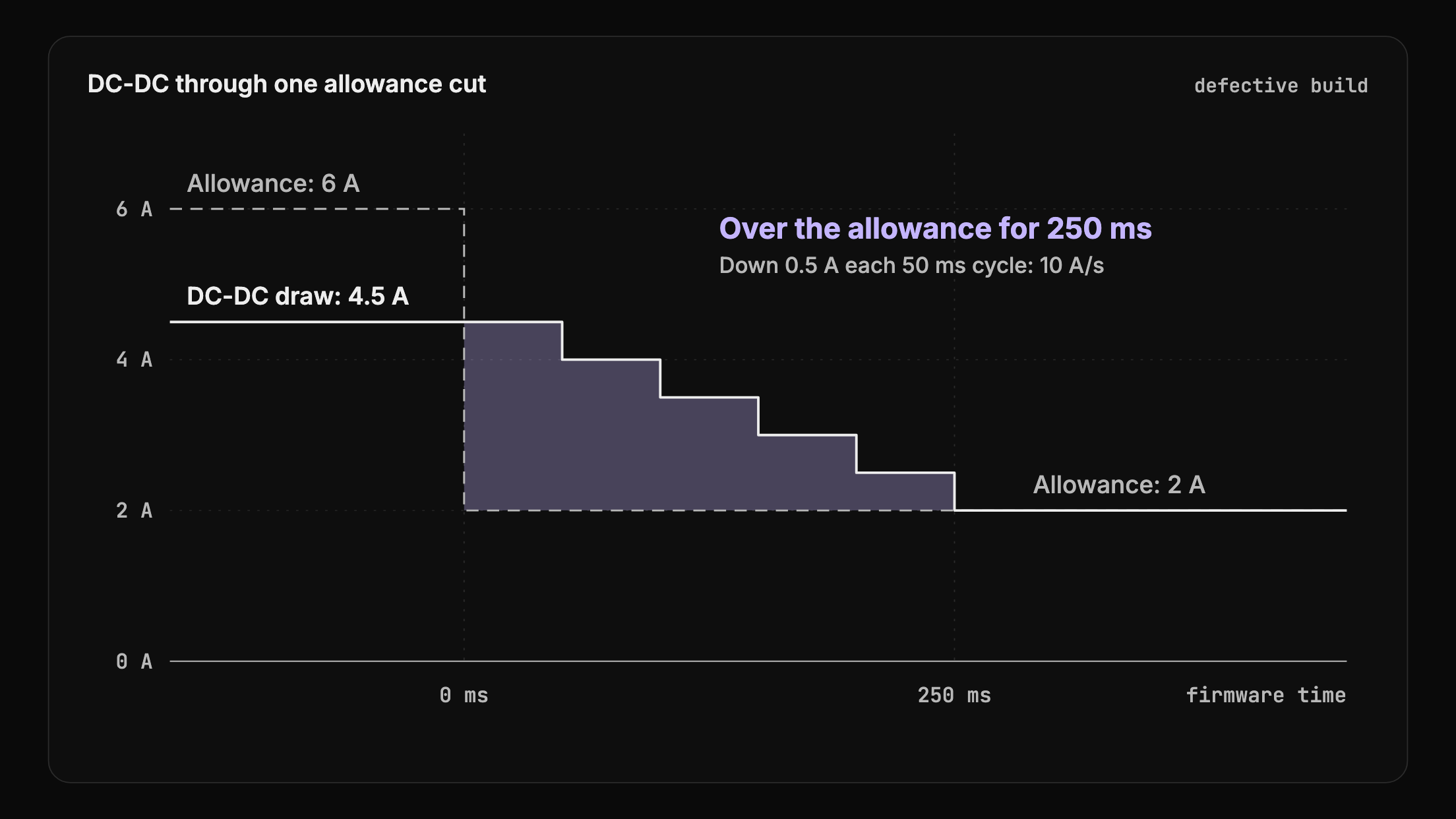
The DC-DC ships in two builds that differ by one Kconfig option. The converter limits how fast its current can rise, which is sensible, because inrush is hard on contactors and input filters. The defective build applies that same limit when the current has to drop.
So when the VCU switches to charge and the BMS cuts the converter's allowance from 6 A to 2 A, the good build drops right away. The defective one ramps down from 4.5 A at 10 A/s and spends 250 ms of firmware time drawing more than it's allowed. Nothing logs an error, and every frame on the bus is valid and in range. It only shows when you plot the allowance against the draw.
just flash defect swaps it in by restarting the containers with the other DC-DC build loaded.
Where the emulation falls short
Renode's CAN model has no acknowledgement, no arbitration and no error frames, so every frame gets through. That means:
- a bitrate mismatch between nodes works fine here and fails on real hardware,
- bus-off and error counters never happen,
- ordering under bus load isn't what real hardware would do,
- nothing electrical exists: no termination, no noise, no ground offset.
Swapping in your own board
Renode loads the board from a script that bench/renode-run.sh writes for every node, and the firmware build reads it from BOARD in the repository's top-level justfile:
machine LoadPlatformDescription @platforms/boards/nucleo_h753zi.replIf Renode models your part and its CAN controller, you can change those, drop in your own firmware and your own DBC, and most of this still applies. If your part names its CAN controller differently, the connector Connect line in the same script changes too. Check Renode's platforms folder first. We haven't tried this on anything but this one STM32.
A real adapter is a different matter. The bench's containers share their own network namespace, so a USB adapter's can0 on the host isn't visible inside them. Part two covers pointing an agent at real hardware.
Everything is in zelos-examples/can-bench, at the can-bench-v1 tag, which is the code exactly as these posts describe it. The repo keeps changing on main. If it misbehaves on your machine, or you get it running on your own part, open an issue. We'd like to hear about it.
In part two we put Zelos on this bench.